Initial import
Bulk Loader performs fast initial data imports into a new Dgraph cluster. It's significantly faster than Live Loader for large datasets and is the recommended approach for initial data ingestion.
Use Bulk Loader when:
- Setting up a new Dgraph cluster
- Importing large datasets (GBs to TBs)
- Performance is critical for the initial load
Bulk Loader can only be used with a new cluster. For importing data into an existing cluster, use Live Loader.
Prerequisites
Before running Bulk Loader:
- Start one or more Dgraph Zeros (Alphas will be started later)
- Prepare data files in RDF (
.rdf,.rdf.gz) or JSON (.json,.json.gz) format - Prepare a schema file
Bulk Loader only accepts RDF N-Quad/Triple data or JSON. See data migration for converting other formats.
Quick Start
dgraph bulk \
  --files data.rdf.gz \
  --schema schema.txt \
  --zero localhost:5080 \
  --map_shards 4 \
  --reduce_shards 1
Understanding Shards
Before running Bulk Loader, determine your cluster topology:
--reduce_shards— Set to the number of Alpha groups in your cluster--map_shards— Set equal to or higher than--reduce_shardsfor even distribution
| Cluster Setup | Alpha Groups | --reduce_shards |
|---|---|---|
| 3 Alphas, 3 replicas/group | 1 | 1 |
| 6 Alphas, 3 replicas/group | 2 | 2 |
| 9 Alphas, 3 replicas/group | 3 | 3 |
Basic Usage
dgraph bulk \
  --files ./data.rdf.gz \
  --schema ./schema.txt \
  --zero localhost:5080 \
  --map_shards 4 \
  --reduce_shards 2
Output Structure
Bulk Loader generates p directories in the out folder:
./out
├── 0
│   └── p
│       ├── 000000.vlog
│       ├── 000002.sst
│       └── MANIFEST
└── 1
    └── p
        └── ...
With --reduce_shards=2, two directories are created (./out/0 and ./out/1).
Deploying Output to Cluster
Copy each shard's p directory to the corresponding Alpha group:
- Group 1 (Alpha1, Alpha2, Alpha3) → copy
./out/0/p - Group 2 (Alpha4, Alpha5, Alpha6) → copy
./out/1/p
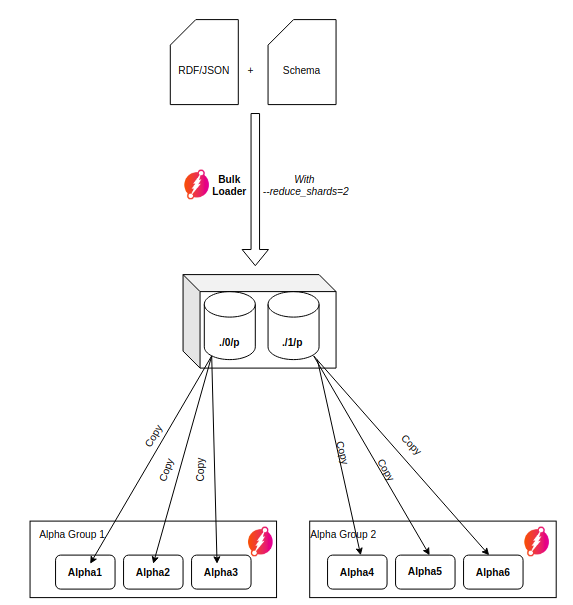
Every Alpha replica in a group must have a copy of the same p directory.
Loading from Cloud Storage
Amazon S3
Set credentials via environment variables or use IAM roles:
| Environment Variable | Description |
|---|---|
AWS_ACCESS_KEY_ID | AWS access key with S3 read permissions |
AWS_SECRET_ACCESS_KEY | AWS secret key |
dgraph bulk \
  --files s3:///bucket/data \
  --schema s3:///bucket/data/schema.txt \
  --zero localhost:5080
IAM Setup
- Create an IAM Role with S3 access
- Attach using Instance Profile (EC2) or IAM roles for service accounts (EKS)
MinIO
| Environment Variable | Description |
|---|---|
MINIO_ACCESS_KEY | MinIO access key |
MINIO_SECRET_KEY | MinIO secret key |
dgraph bulk \
  --files minio://server:port/bucket/data \
  --schema minio://server:port/bucket/data/schema.txt \
  --zero localhost:5080
Deployment Strategies
Small Datasets (< 10 GB)
Let Dgraph stream snapshots between replicas:
- Run Bulk Loader on one server
- Start only the first Alpha replica
- Wait ~1 minute for snapshot creation:
Creating snapshot at index: 30. ReadTs: 4. - Start remaining Alpha replicas — snapshots stream automatically:
Streaming done. Sent 1093470 entries. Waiting for ACK...
Large Datasets (> 10 GB)
Copy p directories directly for faster deployment:
- Run Bulk Loader on one server
- Copy/rsync
pdirectories to all Alpha servers - Start all Alphas simultaneously
- Verify all Alphas create snapshots with matching index values
Multi-tenancy
By default, Bulk Loader preserves namespace information from data files. Without namespace info, data loads into the default namespace.
Force all data into a specific namespace with --force-namespace:
dgraph bulk \
  --files data.rdf.gz \
  --schema schema.txt \
  --zero localhost:5080 \
  --force-namespace 123
Encryption
Loading into Encrypted Cluster
Generate encrypted p directories:
dgraph bulk \
  --files data.rdf.gz \
  --schema schema.txt \
  --zero localhost:5080 \
  --encryption key-file=./encryption.key
Loading Encrypted Exports
Decrypt encrypted export files during import:
# Encrypted input → Encrypted output
dgraph bulk \
  --files encrypted-data.rdf.gz \
  --schema encrypted-schema.txt \
  --zero localhost:5080 \
  --encrypted=true \
  --encryption key-file=./encryption.key

# Encrypted input → Unencrypted output (migration)
dgraph bulk \
  --files encrypted-data.rdf.gz \
  --schema encrypted-schema.txt \
  --zero localhost:5080 \
  --encrypted=true \
  --encrypted_out=false \
  --encryption key-file=./encryption.key
Using HashiCorp Vault:
dgraph bulk \
  --files encrypted-data.rdf.gz \
  --schema encrypted-schema.txt \
  --zero localhost:5080 \
  --encrypted=true \
  --vault addr="http://localhost:8200";enc-field="enc_key";enc-format="raw";path="secret/data/dgraph"
Encryption Flag Combinations
--encrypted | --encryption key-file | Result |
|---|---|---|
| true | not set | Error |
| true | set | Encrypted input → Encrypted output |
| false | not set | Unencrypted input → Unencrypted output |
| false | set | Unencrypted input → Encrypted output |
Performance Tuning
Disable swap space when running Bulk Loader. It's better to reduce memory usage via flags than let swapping slow the process.
Map Phase
Reduce memory usage:
| Flag | Description |
|---|---|
--num_go_routines | Lower = less memory |
--mapoutput_mb | Lower = less memory |
Tip: For large datasets, split RDF files into ~256MB chunks to parallelize gzip decoding.
Reduce Phase
Increase if you have RAM to spare:
| Flag | Description |
|---|---|
--reduce_shards | Higher = more parallelism, more memory |
--map_shards | Higher = better distribution, more memory |
CLI Options Reference
| Flag | Description |
|---|---|
--files, -f | Data file(s) or directory path |
--schema, -s | Schema file path |
--graphql_schema, -g | GraphQL schema file (optional) |
--zero | Dgraph Zero address |
--map_shards | Number of map shards |
--reduce_shards | Number of reduce shards (= Alpha groups) |
--out | Output directory (default: out) |
--tmp | Temp directory (default: tmp) |
--new_uids | Assign new UIDs instead of preserving |
--store_xids | Store XIDs as xid predicate |
--xidmap | Directory for XID→UID mappings |
--format | Force format (rdf or json) |
--force-namespace | Load into specific namespace |
--encryption | Encryption key file |
--encrypted | Input files are encrypted |
--encrypted_out | Encrypt output (default: true if key provided) |
--badger compression | Compression: snappy, zstd, or none |
See dgraph bulk CLI reference for the complete list.